Get Legal Help Data Structures
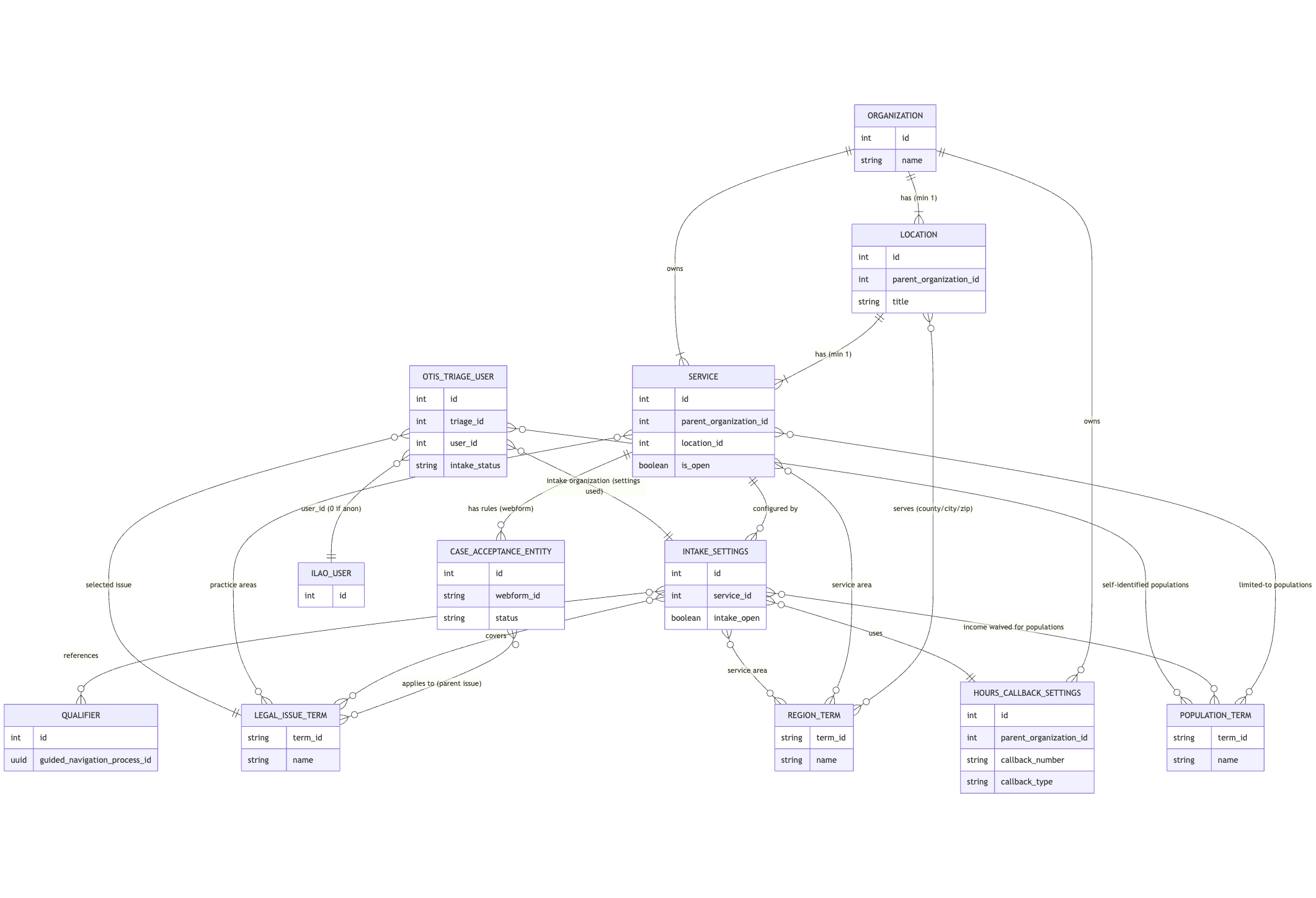
Organization
Field |
Type |
Description |
|---|---|---|
ID |
Auto-generated number |
|
Name |
Short text Required |
Name of the organization |
Alternate name |
Short text |
Alias of an organization, if applicable |
Description |
HTML |
Organizational description |
Physical address |
Address Required |
Street address, city, state, zip code |
Display address to public users |
Yes/No Required |
Indicates whether address can be shown when providing a referral |
Mailing address |
Address Required |
Street address, city, state, zip code |
Phone number |
Telephone Required |
Telephone number as (xxx) xxx-xxxx |
Contact email address |
Email Required |
Email address for primary/general contact |
Website addresss |
URL; Required |
Full website url |
URL |
Link to org’s Facebook page |
|
Twitter/X |
URL |
Link to org’s Twitter/X page |
URL |
Link to org’s instagram feed |
|
Associated email domains |
Short text; multiple |
Domains associated with organization; users registering with the domain are given legal aid permissions automatically |
Public referral |
Yes/No Required |
Indicates whether organization provides services to the public. |
Maximum callbacks per we call you slot |
Number |
For OTIS orgs, when set, limits callbacks per slot universally |
Locations
Every organization must have at least one location.
Field |
Type |
Description |
|---|---|---|
ID |
Auto-generated number |
|
Parent organization |
Number; required |
ID of the organization |
Title |
Short text Required |
Title/name of the location (main office, Alton office, etc) |
Address |
Address Required |
May be copied from organization; street address, city, state, zip code |
Phone number |
Telephone Required |
May be copied from organizatio |
TTY phone number |
Telephone |
TTY phone number, if applicable |
Toll-free number |
Telephone |
Toll free number, if applicable |
Weekly hours |
Complex Required if not open at least weekly |
First occurence start and end dates Repeat rule baed on RRule format |
Hours |
Office hours Required if open at least once a week |
Up to 4 time slots per day, each with its own start and end times |
Holidays |
Holiday taxonomy term Unlimited cardinality |
Holidays when a location is closed |
Serves all of IL |
Yes/No; required |
Yes for statewide organizations; no for all others |
Counties |
Term reference to county level of region taxonomy; unlimited cardinality |
Counties served by a location |
Cities |
Term reference to city level of region taxonomy; unlimited cardinality |
Cities served by a location |
Zip codes |
Term reference to county level of region taxonomy; unlimited cardinality |
Zip codes served by a location |
Income eligibility |
Single select Required |
Free, Free to eligible persons, sliding scale based on income, flat fee |
Income standard |
Single select |
Required when free to eligible persons. Options are Federal poverty level and area median income |
Max. percentage of income standard |
Number |
Required when free to eligible persons. |
Sliding scale description |
Long plain text |
Required when income eligibility is sliding scale |
Flat fee description |
Long plain text |
Required when income eligibility is flat description |
Note
ILAO maintains a taxonomy of holidays, each with an associated date rule. We will also use this taxonomy to create “holidays” when an organization will be closed outside of typical holidays.
Note
The location geographic area could have been implemented better. We eventually moved to a Jurisdiction/Negate Jurisdiction option in other places but have not refined here. With that it is easy to mark an organization as Illinois except for Chicago or Illinois except for Cook County. The current system requires a choice between one of Statewide, 1 or more counties, 1 or more cities or 1 or more zip codes. These are stored i our Region taxonomy.
Services
Every location must have at least one service.
Field |
Type |
Description |
|---|---|---|
ID |
Auto-generated number |
|
Parent organization |
Number; required |
ID of the organization |
Location |
Number; required |
ID of the location |
Is service open? |
Yes/No; required |
No referrals are made if set to No |
Service type |
Single select Required |
One of: direct representation, legal info and education; self-help center; lawyer referral service;policy, impact litigation support, or other |
Phone number |
Telephone; required |
Can be copied from location; phone number for service. |
Income eligibility |
Required |
Can be copied from location; otherwise, same questions as in location. |
Is service limited by population |
Yes/No; Required |
Indicates if the service is limited to specific groups (seniors, disabled, etc) |
Populations |
Term reference to intake populations |
One or more populations a person must be to qualify for service. Req. if limited |
Service area |
Required |
Can be copied from location; otherwise is statewide, counties, cities, zip codes fields required |
Best bet for groups |
Term reference to populations |
Allows ILAO staff to promote a referral outside of OTIS for specific populations |
Best bet for legal issue |
Term reference to legal issues taxonomy |
Allows ILAO staff to promote a referral outside of OTIS for specific legal issues |
Direct representation fields
These fields are unique to services that provide direct representation.
Field |
Type |
Description |
|---|---|---|
ID |
Auto-generated number |
|
Service is hotline |
Yes/No; required |
Used to indicate if a service is a hotline |
Advice desk or walk-in clinic |
Yes/No; required |
Used to indicate if advice desk or clinic |
Level of service |
Multi-select required |
Extended representation, brief services, advice, mediation/ADR, pro bono placement |
Service delivery |
Multi-select Required |
In-person, phone, online/remote (incuding real-time and asynchronous communication |
Practice areas |
Multi-select Required |
Legal issues taken from ILAOs’ legal issues taxonomy |
Average volume |
Number |
Estimate number of clients/cases per month Used for cold referrals to prioritize |
Application process |
Multi-select Required |
Telephone, walk-in, online, email, online through OTIS |
Telephone process |
Plain long text |
Description of how one applies via phone; used to set expectations |
Walk-in process |
Plain long text |
Description to how one applies via walk-in where process includes walk-in |
Online process |
Plain long text |
Description of the online process where process includes online |
Application form |
URL |
Link to online application form if process includes online |
Email process |
Plain long text |
Description of the email applicaton process when process includes email |
Email address for email applications |
||
Program name for Legal Server |
Short text |
For OTIS partners, their legalserver name for mapping etransfers if on LegalServer |
Callback slots per applicant |
Number |
Number of callback slots a person can choose to schedule a callback |
Maximum callback per slot |
Number |
Maximum callbacks that can be scheduled in a time slot per service. Can be overridden at the organization level |
Intake Settings
Intake settings are tied to a specific service. A service can have an unlimited number of intake settings but each should be unique.
Field |
Type |
Description |
|---|---|---|
ID |
Auto-generated number |
|
Name |
Short text |
Name for the intake settings |
Service |
Number |
ID of the associated service |
Legal issues |
Multi-select Required |
Legal issues taken from ILAOs’ legal issues taxonomy; may be copied from service |
Service area |
Required |
Can be copied from service; otherwise is statewide, counties, cities, zip codes fields required |
Intake open |
Yes/No; required |
Indicates whether intake is open or closed |
Number of intakes allowed |
Number; required |
Number of intakes to allow per time period Zero is treated as unlimited |
Intake reset period |
Daily, weekly, or monthly. |
Required when number of intake is not zero Count of etransfers reset based on this |
Allow applications from jail/prison |
Yes/No; required |
Allows/disallows applications from jail or prison. |
Minimum age to qualify as a senior |
Number; required Defaults to 60 |
Individuals at or above this age are considered seniors for intake purposes |
Minimum age to apply |
Number; required Default is 18 |
Minimum age to apply via OTIS. Minimum is 13 to comply with online regulations |
Qualifiers |
Term reference to qualifiers |
Option rules to apply to the intake to determine eligibility |
Collect income? |
Yes/No; required |
Determines whether we collect income |
Income types |
Term reference to income types; multi-select |
List of income types to collect when income is collected |
Apply income limit |
Yes/No; required |
Determines whether the system tests for income eligibility |
Income standard |
Single select |
Required when apply income limit is yes. Options are Federal poverty level and area median income |
Max. percentage of income standard |
Number |
Required when apply income limit is yes |
Waive income for populations |
Multi-select term reference to population taxonomy |
Ignores income calculation for these groups |
Collect income for waived populations |
Yes/No required |
If No, income will not be collected for people in those populations |
Hours & Callback settings |
Hours Entity |
Indicates which hours & callback rules to use |
Bypass intake and contact program |
HTML text |
Message to display when programs want the person to call instead of apply online |
Program disclaimer |
HTML text |
Text to display after application complete as required by the organization |
Household definition |
HTML text |
Text to display to help applicants define adults and children in household |
Exit message for current clients |
HTML text |
Text to display if applicant indicates they are already clients for this problem |
Exit message for applicants who applied already |
HTML text |
Text to display if applicant indicates they’ve already applied to the program. |
“Please call us” message |
HTML text |
Text to display for completed applications where the applicant must call program |
“We call you” message |
HTML text |
Text to display for completed applications who have scheduled a callback/appointment |
Collect country |
Yes/No; required |
Should we collect country of origin |
Collect ethnicity |
Yes/No; required |
Should we collect ethnicity |
Collect adverse information |
Yes/No; required |
Should we collect adverse party information |
Note
The system collects race, gender, language spoken at home, marital status automatically.
Hours & Callback Settings Entity
Hours and callback settings are tied to an organization and can then be attached to any intake settings on any service for that organization.
Field |
Type |
Description |
|---|---|---|
ID |
Auto-generated number |
|
Title |
Short text |
Title of the entity; useful for finding |
Parent organization |
Number |
ID of the parent organization |
Callback number |
Telephone; required |
Phone number for person to call program |
Callback type |
Single select; required |
Options are we call cient, client calls, or we call client - no appointment |
Maximum callbacks |
Number; optional |
Maximum callbacks per slot |
Call back hours by day |
Multi-select slots |
Time slots for callbacks; each day has its own select field |
Hours of operation |
Office hours Required if open at least once a week |
Up to 4 time slots per day, each with its own start and end times |
Add to calendar |
Yes/No; required |
Indicates whether we should add callback to program calendar |
Legalserver URL |
URL |
Base url for calendar on LegalServer |
Calendaring URL |
URL |
Full url of calendaer to add appointment to |
Calendaring credentials |
Short text |
Token or API credential to write to calendar |
Note
Callback hours are grouped in 1 hour slots from 6am to 10:30am, with starting times on the hour and half-hour. Additionally, blocks of morning, afternoon, and evening are also available.
Qualifiers
Qualifiers live in Guided Navigation in LegalServer. They are referenced via the Qualifiers taxonomy. See Qualifiers for more information.
Field |
Type |
Description |
|---|---|---|
ID |
Auto-generated number |
Term D |
Name |
Short text |
Name of the qualifier |
Guided Navigation process ID |
UUID |
UUID for the process from LegalServer |
Case Acceptance Entities
Case acceptance rules are managed through Drupal’s webforms module. Submitted webforms represent a specific service’s case acceptance. See Creating case acceptance webform for more information.
Field |
Type |
Description |
|---|---|---|
ID |
Auto-generated number |
Webform ID |
Title |
Short text |
Title formatted as Case Acceptance - Topic |
Status |
Open/Closed |
Indicates whether a webform should accept new submissions. |
Service |
Entity reference Required |
Reference to the service the submission is attached to. |
Legal issue |
Term reference to legal issues taxonomy |
Reference to parent legal issue; all child terms will use this form to determine case acceptance for the service |
Outcomes |
Checkboxes; Multiple selection |
Each checkbox corresponds to a specific outcome from a completed Guided Navigation process. |
Case acceptance submissions by programs are then used to match outcomes from Guided Navigation to specific services when completed by applicants.
OTIS Triage User
The OTIS triage user (aka the OAS triage entity) stores information from a specific intake via OTIS.
Note
ILAO does not keep all relevant data in the OTIS triage user entity. Some information is just passed through to the organization.
Field |
Type |
Description |
|---|---|---|
ID |
Auto-generated number |
Triage ID |
User_ID |
Number |
If the user has an ILAO account, their id; otherwise, 0 |
Status |
Open/Closed |
Indicates whether a webform should accept new submissions. |
Created |
Timestamp |
Timestamp of when the record was created |
Changed |
Timestamp |
Timestamp of the last time the record was changed |
Intake_created |
Timestamp |
Timestamp of when intake was started if offered |
Intake_changed |
Timestamp |
Timestamp of the last time intake was changed if started |
Zip code |
Short text |
Zip code as entered by the applicant |
Household size |
Number |
Total household size |
Household adults |
Number |
Number of adults in household |
Household children |
Number |
Number of children in household |
Overincome |
Yes/No |
Indicates if a person was over-income |
Last screen viewed |
Small text |
Tracks which intake form page the user last viewed. Allows us to track dropoff |
County |
Small text |
County name |
State |
Small text |
State name of user’s location |
Total income |
Number |
Total income as collected |
Triage status |
Short text |
One of a set of predefined triage statuses Includes referrals, self-help, program triage completed, legal issue |
Intake status |
Short text |
One of a set of predefined intake statuses Includes started, diverted, eTransferred, Bypass, Offered, Overincome |
Intake organization |
Entity reference |
Intake settings ID used to match user |
LSC code |
Short text |
Not currently used |
LSC subcode |
Short text |
Not currently used |
Referral source |
Short text |
Tracks how user entered system (SMS, Fast entry, etc) |
Gender |
Short text |
Applicant’s gender |
Race |
Short text |
Applicant’s race |
Ethnicity |
Short text |
Applicant’s ethnicity |
Marital status |
Short text |
Applicant’s marital status |
Age |
Short text |
Applicant’s age |
Primary language |
Short text |
Applicant’s language |
Country of origin |
Short text |
Applicant’s country of origin if provided |
Adverse party |
Adverse party entity Unlimited |
First, middle, last name, type, address city, state, zip, business name |
Callbacks selected |
Text |
List of selected callback times |
User’s email adddress |
||
Rejection date |
Date |
Date application rejected by legal aid |
Populations |
Term reference to populations taxonomy |
User-identified special populations |
Guided navigation Profile |
JSON |
JSON results sent from Legal Server Guided Navigation process |
Mobile phone |
Telephone |
Mobile number of applicant; required to receive text messages |
SMS Opt In |
Yes/No |
Whether the user has opted in to SMS from ILAO |
Triage search |
Text |
Any free-form text the user searched on |
Legal issue |
Term reference to legal issues taxonomy |
Lowest level legal issue identified by user |
Legal Server UUID |
UUID |
UUID returned by Legal server during eTransfer |
Note
ILAO collects but does not store date of birth, individual income types and amounts, or uploaded documents.