Tagging for Motionpoint
In content
In content, we sometimes have strings that we do not want to have Motionpoint change. The most common use case is in Easy Forms where we want the English title to appear next to the translated Spanish title.
To tag content
To tell Motionpoint to ignore text and render as is:
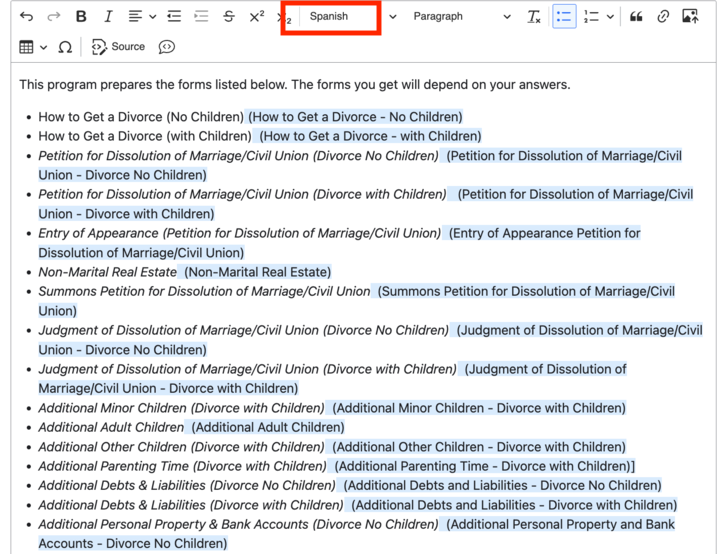
Highlight the text you want Motionpoint to ignore
In the styles dropdown, select Spanish
The text will display in the WYSIWYG with a light blue background
The text will not display on the front-end of the English site
The text will appear as is on the Spanish site.
Will be replaced with the appropriate Motionpoint Directive Tags (DT). See below for the resulting HTML that will be shown in the “View source” in the browser on the front-end.
When rendered on the front end, the <span class=”Spanish”> tags will be replaced with the correct Motionpoint DT tags.
<!-- mp_trans_disable_start -->
<!-- mp_trans_add
  <span>The text you want ignored</span> -->
 <!-- mp_trans_disable_end --> “
Controlling Block Visibility by Language (Motionpoint)
Some blocks should only appear on the English site, and others only on the Spanish site. You can now control this directly in the block layout UI — no developer needed.
How it works
When a visitor lands on the Spanish site, their traffic is routed through Motionpoint’s servers. The new Motionpoint visibility condition detects this and shows or hides a block accordingly.
Setting visibility on a block
Go to Structure > Block layout and find the block you want to configure, or place a new block.
Click Configure on the block.
Scroll down to the Visibility section and expand it.
Click Motionpoint to expand the condition.
Choose your setting: - Show on Spanish site only — the block will only appear when traffic comes through Motionpoint (i.e., the Spanish site). - Show on English site only — the block will be hidden when traffic comes through Motionpoint. - Show on all pages (default) — no Motionpoint filtering; the block appears everywhere.
Save the block configuration.
Common use cases
Showing a Spanish-only block (e.g., a Spanish-language search widget or banner): place the block and set visibility to “Show on Spanish site only.”
Hiding an English-only block from Spanish (e.g., Ask ILAO search, which has a separate Spanish equivalent): find the block and set visibility to “Show on English site only.”
Note
This condition works alongside other visibility conditions (e.g., pages, roles). All conditions must be met for the block to display.
For more complex cases — such as views or components that need language-specific behavior — contact Gwen or Mike, as those require developer implementation.
Do not use native Drupal language conditions for Motionpoint-related visibility; use this condition instead.